We Installed Screens in Hotels. Here’s What We Learned
Practical lessons from Pixly’s hospitality projects: digital totems, touch screens, menus, events, CMS, wayfinding and guest communication.
Information Is Not the Same as Communication
Hotels always have plenty of information to share.
Breakfast times, menus, events, meeting rooms, spa, activities, maps, transport, internal services, useful contacts, temporary notices and local recommendations.
The issue is that this information is often scattered: printed sheets, posters, reception, emails, QR codes, TVs in rooms, websites, WhatsApp messages or explanations from staff.
All these can work, but they can also create noise.
When guests have to constantly ask where something is, when an activity happens or what the weekly menu is, the problem isn’t necessarily lack of information. It’s lack of communication in the right place.
The Lobby Is a Decision Zone
The lobby is more than just a passage area.
It’s where guests arrive, wait, ask, confirm, decide and orient themselves. It’s also one of the few places where physical communication can influence the experience in real time.
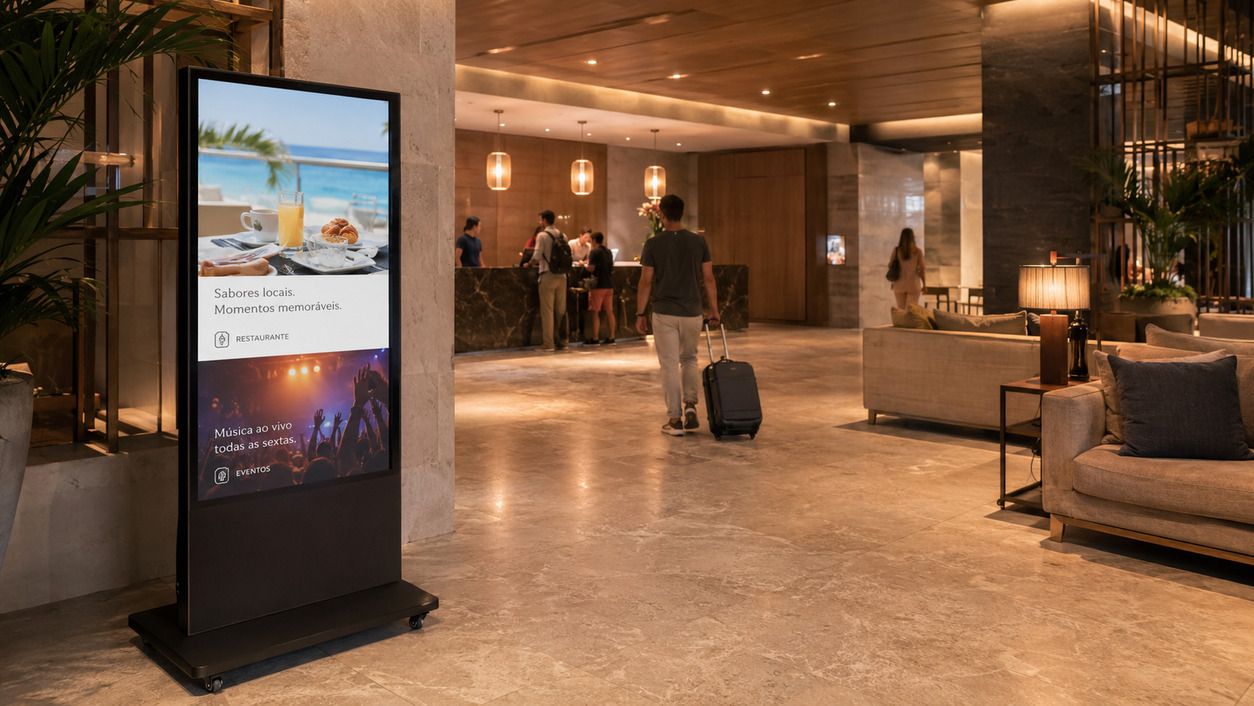
A well-placed digital screen in the lobby can answer questions before they reach reception.
It can display:
- daily events;
- restaurant hours;
- weekly menus;
- hotel services;
- available experiences;
- maps or directions;
- institutional videos;
- internal campaigns;
- seasonal information.
The goal isn’t to fill the lobby with technology. It’s to make information more visible, current and useful.
The Right Screen Shouldn't Feel Intrusive
In hospitality, a common mistake is choosing technology that feels out of place.
Not every hotel wants a solution that’s too techy, aggressive or flashy. Many look for something discreet, elegant and functional.
This was clear in projects where the goal wasn’t to turn the hotel into a “futuristic” space, but to improve internal communication without breaking the atmosphere.
In these cases, a mobile digital totem can be a good solution: it has presence, is flexible, can move between hotel areas and doesn’t require permanent installation.
Mobility Can Be More Important Than It Seems
Hotel spaces change function throughout the year.
One area might be important in summer, another in winter. A room might host events one week and be closed the next. A restaurant might want to communicate menus at certain times, while a conference room needs information on other days.
That’s why equipment on wheels can be more useful than fixed installations.
It allows placing the screen:
- in the lobby;
- near the restaurant;
- at the entrance to an event room;
- in a conference area;
- next to an exhibition or activation;
- in a busy corridor.
This flexibility reduces the risk of the screen being “stuck” in a place where it doesn’t always make sense.
When to Use Touch and When to Use Informative Content Only
Not all hotel screens need to be touch-enabled.
Sometimes an informative screen is enough: daily events, menus, schedules, notices or institutional videos.
But when guests need to choose, explore or navigate, touch makes more sense.
A touch screen can be useful for:
- interactive maps;
- image galleries;
- activity information;
- navigable menus;
- service directories;
- content by language;
- resort experiences;
- weekly events;
personalised information by area.
The decision shouldn’t be “touch just because”. It should depend on what the guest needs to do.
Software Is As Important As The Screen
Often, the conversation starts with the equipment: size, brightness, stand, touch, indoor or outdoor.
But in hospitality, software is one of the most important parts.
If hotel staff can’t easily update content, the screen quickly loses value.
A good system should allow content changes without always relying on technicians, designers or external suppliers.
This is especially important for:
- weekly menus;
- events;
- posters;
- schedules;
- seasonal campaigns;
- videos;
- temporary information;
content by hotel area.
The screen is the visible part. The CMS is what keeps it useful.
On-Site Training Prevents Many Issues
Providing equipment and installing it isn’t enough.
Hotel staff need to understand how to update content, which formats to use, how to organise campaigns and what mistakes to avoid.
A short on-site training session can make a big difference, especially when several people are involved in operations.
The goal should be simple: after installation, the team should feel confident using the system.
This reduces technical dependence and increases the likelihood the screen will be actively used daily.
Outdated Content Destroys Trust
A digital screen showing old content is worse than an old poster.
Why? Because a screen suggests up-to-date, dynamic, real-time information. If it shows past events, wrong menus or outdated schedules, guests lose trust.
This is especially sensitive in hotels.
Digital communication needs a clear routine:
- who updates;
- when they update;
- which content expires;
- which content is seasonal;
which content should always be active.
Without this routine, the screen quickly goes from useful to decorative.
Content Should Help, Not Decorate
One of the biggest mistakes with hotel screens is using only pretty videos.
Institutional videos and images of the space are useful, but shouldn’t be the only content.
A hotel doesn’t just need to show it’s beautiful. It needs to help guests decide and find their way.
Some useful questions:
- What information do guests most often ask about at reception?
- Which hotel services are little known?
- Which experiences could sell more if they were more visible?
- Which menus or events need greater prominence?
- Which hotel areas need better guidance?
The answers to these questions should guide the content.
Screens Near Conference Rooms Have a Different Role
In hotels with meeting or conference rooms, informative screens near these rooms can be very useful.
They help identify events, schedules, company names, occupied rooms, coffee breaks or temporary directions.
In this context, the screen doesn’t need to be complex.
It needs to be clear, readable and up to date.
For business events, this communication also improves the hotel’s professional image. A participant who quickly finds the right room experiences less friction and more confidence in the organisation.
Outdoor Screens Require Higher Standards
When it comes to outdoor screens in hotels or resorts, demands increase.
You need to consider:
- brightness;
- durability;
- protection against heat, rain and humidity;
- sun exposure;
- vandalism;
- accessibility;
- legibility;
maintenance.
Also, if the screen is interactive, the software needs to be even more carefully designed: large buttons, simple navigation, few steps and useful content.
Outdoors, guests don’t want to “explore technology”. They want to quickly find what they need.
After-Sales Support Matters
In hospitality, equipment operates in a demanding environment.
There are different teams, shifts, events, peak seasons, content changes and unforeseen needs.
That’s why after-sales support is an essential part of the solution.
Sometimes the support needed is simple: clarifying a doubt, reminding how to update content, adjusting a file, reorganising a playlist or confirming everything is working.
But this assistance makes a difference.
A digital screen shouldn’t be seen as a one-off purchase. It should be seen as a communication channel that needs continuity.
What We Learned
After installing solutions in hotels, some clear conclusions emerge.
First, technology should serve the experience, not dominate the space.
Second, software and ease of updating are as important as the equipment.
Third, content should answer real guest questions.
Fourth, training and support greatly increase the chances of success.
And fifth, when well thought out, a digital screen can reduce noise, improve orientation and highlight services that often go unnoticed.
Conclusion
Hotels don’t need screens everywhere.
They need the right screens in the right places, with useful, updated and easy-to-manage content.
A digital totem in the lobby, an informative screen near an event room or a touch solution for experiences and guidance can have real impact when linked to a specific need.
In the end, the question shouldn’t be “which screen do we want to install?”.
The right question is:
What information do we want guests to receive, when, and how can we make that experience simpler?