Software & CMS
Software to manage digital screens, content and campaigns without complexity
Pixly helps companies, hotels, restaurants, shops, clinics and other commercial spaces manage digital screen content in a simple, remote and organised way. Pixly CMS is designed to centralise campaigns, menus, videos, images, schedules and messages across multiple screens, with an AI-assisted content creation layer through Pixly AI Content Studio.
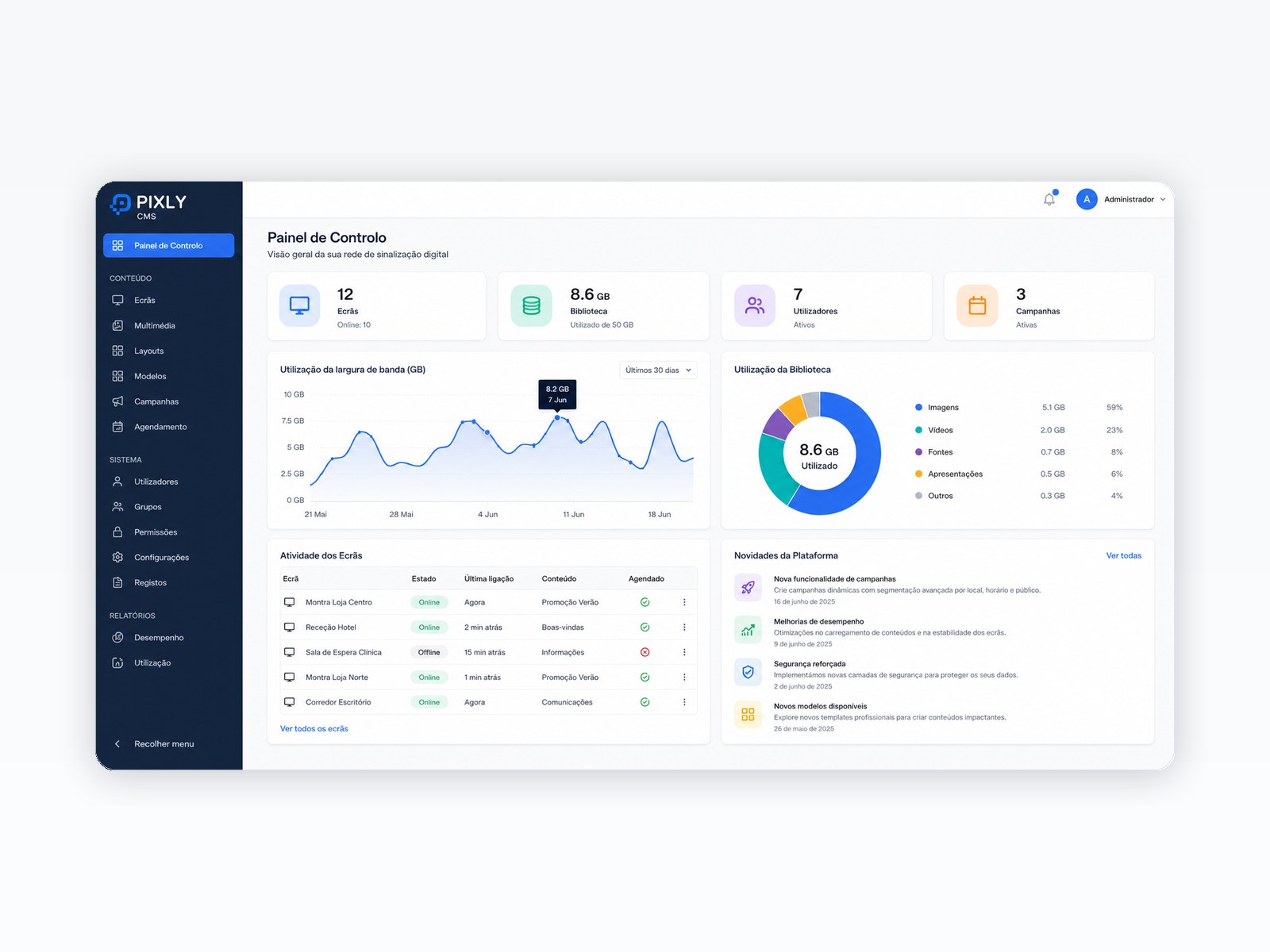
Content, campaigns, screens and AI management
Some Pixly clients and projects



%20translate(555.59%20425.394)'/%3e%3c/g%3e%3c/g%3e%3c/g%3e%3c/svg%3e)

The problem
A digital screen without simple software quickly becomes hard to maintain
Many businesses buy digital screens but remain stuck with USB drives, loose files, manual updates or unintuitive platforms. The right software allows content updates, campaign management and control of several screens without complicated processes.
Content updated manually by USB or loose files
Campaigns hard to schedule by day, time or location
Several screens without centralised management
Teams dependent on third parties for small changes
Features
What you can manage with a digital signage CMS
The platform choice depends on the equipment, goal, number of screens and remote management needs. These are common features in professional CMS solutions.
Remote content
Update images, videos, menus, campaigns, notices and messages without physically accessing the screen.
Playlists and campaigns
Organise content by sequence, duration, schedule, campaign, store, area or screen type.
Scheduling
Schedule content for specific days, times, seasonal campaigns or promotional periods.
Management by screen or location
Show different content by screen, store, restaurant, reception, room or space area.
Content library
Centralise images, videos, documents, menus and creatives in one organised place.
Users and permissions
Let different people edit content without giving full access to configuration.
Pixly AI Content Studio
Creating digital screen content with AI support
Pixly AI Content Studio helps accelerate the creation of campaigns, promotional messages, sector-based content and formats adapted to different types of screens. The idea is simple: turn commercial goals into content that is faster to prepare, easier to adapt and better aligned with each space.
Campaign ideas
Generate campaign suggestions for restaurants, hotels, shops, clinics, real estate agencies or other sectors.
Promotional copy
Create short commercial messages for menus, windows, mupis, receptions and waiting areas.
Sector-based content
Adapt messages to hospitality, food service, healthcare, retail, real estate, companies or education.
Formats for different screens
Prepare content for horizontal, vertical, mupi, menu board or window screen formats.
Simple architecture
How it works, explained simply
The architecture depends on the project, but the logic is simple: content is prepared in a management panel, sent through the cloud or configured network and displayed on compatible screens.
1. Create or upload content
Menus, videos, images, campaigns, notices or content created with AI support.
2. Organise and schedule
Define where, when and for how long each content should appear.
3. Send to screens
Content is distributed to compatible equipment through the selected CMS.
4. Update when needed
The team can change content, campaigns and schedules without complex manual processes.
Compatibility
CMS selected according to equipment and goal
Today, Pixly works with CMS and platforms suited to different projects, including manufacturer solutions, Samsung VXT, Xibo, Android, external players and supplier platforms. The best option depends on operating system, number of screens, content type, budget and management needs.
Cloud management to update content remotely
Compatibility with professional screens and external players
Solutions for installations with one or multiple screens
Different content by location, zone or device
Custom software when the project requires specific features
Custom software
We also develop personalised solutions for special projects
Not every project fits a standard CMS. When the goal requires a specific experience, Pixly can develop personalised solutions, including touch screens, interactive interfaces, custom content and client-specific integrations. We have already developed this type of solution for demanding commercial projects, including custom touch experiences for clients in premium areas such as Quinta do Lago.
Touch screens
Interactive interfaces for content browsing, maps, menus, catalogues, services or brand experiences.
Integrations
Connection to data, forms, websites, APIs, dynamic content or internal systems.
Tailored experiences
Software designed around the client’s space, brand, audience and commercial goal.
Want to understand if a CMS or custom solution makes sense for your screens?
Book a demo or talk to us about your case. This request origin helps us understand real interest in software, CMS and AI Content Studio.
Testimonials
What some clients say
“The digital screens are high quality, easy to manage and truly make a difference in how we communicate with customers. The team was professional, available and very detail-oriented.”
Sónia Teixeira
Marketing Director · Hospitality
“The façade LED panel has excellent brightness and visibility, both during the day and at night. The installation was quick and the final result was flawless. We are very satisfied with Pixly’s work.”
Tiago
Sales Manager · Retail
“Quality work, with a good-value solution. I am very satisfied with my LED panel, which remains visible even in daylight. I highly recommend it.”
Cristina Oliveira
Marketing · Healthcare
FAQ
Frequently asked questions about digital signage software and CMS
Is Pixly CMS suitable for any business?
It is suitable for businesses that need to update digital screen content in a simple, remote and organised way. The ideal setup depends on the type of screen, number of devices, content needs and level of personalisation required.
Does the software work with any screen?
It depends on the equipment and installation architecture. In many cases, the solution can be adapted through the screen’s own system, external players or a personalised configuration.
Can I update content without calling a technician?
Yes. That is exactly the goal: allowing menus, campaigns, images, videos and notices to be updated easily.
Can AI help create content?
Yes. Pixly AI Content Studio is designed to help generate ideas, promotional copy, sector-based messages and content adapted to different screen formats.
Does Pixly develop custom software?
Yes. For special projects, especially with touch screens or specific requirements, we can develop custom interfaces and personalised solutions.